Two ways to let Claude animate. Only one leaves you something to edit.
AI workflows
5 min read

What you’ll learn
Both routes produce a file that plays. Only one produces a file you can still change.
A traced scene carries one keyframe per frame: 31 keys on 31 frames, 62 on 62.
Two keyframes and a curve retime by dragging. A traced track needs a rebuild from the script.
Starting from nothing, the tools also bring the timings: 0.5 to 0.8 s entrances, 0.05 to 0.12 s staggers, scale in from 94 percent.
Script the job when the result is a faithful copy that will never be touched again.
We ran the experiment properly. Same reference video, same AI, two routes: once with MotionUI, once with Claude writing ExtendScript straight into After Effects. Here is what came out, and what it means for how you should work.
Both routes finished
The script route worked. Claude rebuilt an eleven scene spot, near frame accurate, in a clean structure: one precomp per scene laid end to end, nulls as group parents, real text layers, proper parenting. Our own quality check found no issues in it. Nothing about that result is sloppy.
So the honest headline is not "the script route failed". It is this: both files play. They are not the same kind of file.
The difference is in the keyframes
We measured one second of the finished scene.
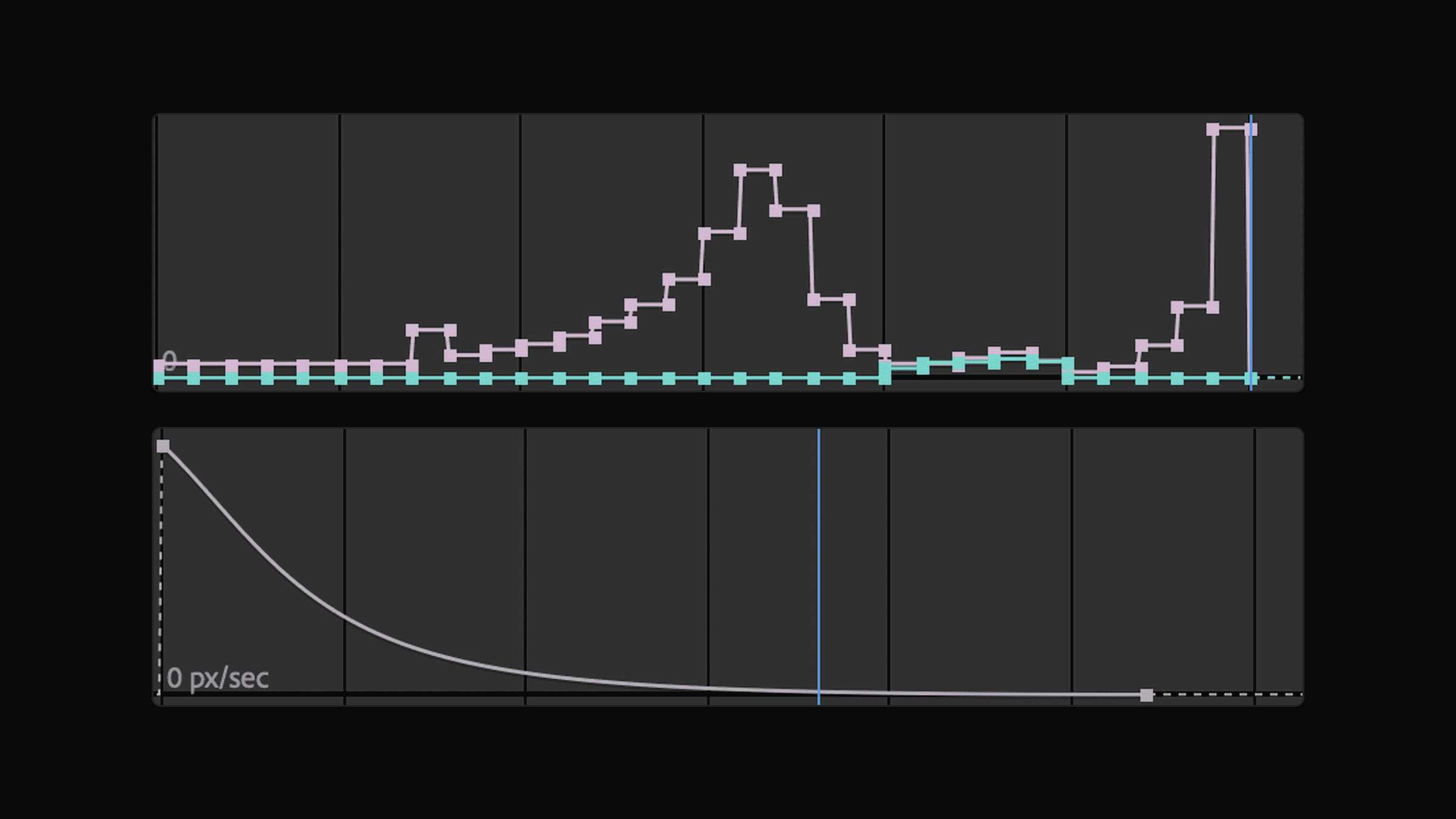
Both straight out of the After Effects graph editor. Above, the speed of the traced track. Below, the same distance in the same time, carried by one curve.
The traced scene is 31 frames long and carries 31 keyframes on every animated property. One per frame. In a two second scene it is 62 per property, even on a headline that barely moves.
That is not a bug. It is what tracing produces. To match a reference frame by frame, you have to pin every frame.
The MotionUI version of the same move is two keyframes and a curve.
What that costs you on Monday
Play both and you cannot tell them apart. Then the client says the panel should come in a little later and settle a little softer.
With two keys you drag one of them. The curve carries the rest, and you watch it update while you drag.
With 31 keys there is nothing to drag. There is no curve, because the curve is the measurement. Changing the timing means going back to the script that generated the keyframes, changing a number, and regenerating the whole scene. That holds for you, and it holds for the AI too. Neither of you can nudge it in the timeline.
You also lose the small things you never think about until they are gone: retiming a comp, stretching a scene to fit a cut, reusing the move on another layer, handing the project to someone who does not have your script.
When the script route is right
Rebuilding an existing edit frame by frame. That is the job the script route won, and it won clearly.
MotionUI does not do that, on purpose. Its reference tool measures the character of a move, the shots, the phases, the holds and the shape of the easing, and then you rebuild it with curves you own. That gets you something in the spirit of the original that you can still push around. It does not get you a frame exact copy.
So pick by what you need at the end. A faithful reproduction of a finished film, once, never to be touched again: script it. Anything a client will comment on: build it with tools.
Starting from nothing is the other half
Everything above is about copying a film that already exists. Most work is not that. Most work starts from a screen and a brief, and the question is not "can you match this" but "what should this even look like".
A script has no opinion. It can move a layer from A to B, but how long that takes and what the curve is has to be invented on the spot, every time. Ask twice, get two answers, and both of them tend toward the safe middle: a bit linear, a bit slow, nothing wrong and nothing right.
The tools carry the answer instead. Entrances land in 0.5 to 0.8 seconds on a quint curve. Staggers sit between 0.05 and 0.12 seconds, tighter the more items there are. Scale entrances start at 94 to 96 percent, not at 40. Camera moves run on expo, one second for snappy and two for calm, never under 0.8 for a large move. A typewriter runs at about 0.04 seconds per character. Motion blur goes off on text that does not move by itself, because otherwise it smears alone while the camera pans.
None of those are taste. Each one is a correction that came back from a real job, and it stayed in the plugin so it would not have to come back twice.
Transitions are the clearest case. A match cut is not "fade one out, fade the other in". It is both scenes built at their final positions, a control null on each group, the outgoing motion continuing through the cut, blur on the handover, and the next scene pre-rolled so its main element is already moving when you land on it. That is a lot of craft to carry in a prompt. It is one call with the tool.
The same goes for judging the result. The panel can review a comp against those rules and tell you what is off, down to a chip whose padding is two pixels wider on the left. A script has nothing to check itself against, so it checks nothing.
So the two arguments stack. When you rebuild something, the tools keep your file editable. When you start from nothing, they also start from somewhere.
How to work with Claude and MotionUI
The point of the plugin is not that the AI clicks buttons for you. It is that the AI works in the same material you do, and leaves it that way.
Let it see. Claude renders single frames out of your comp and reviews them against a checklist built from real client revisions. Ask it to show you a frame before you believe a result. An AI that cannot look at its own work is guessing.
Give it building blocks, not instructions. "Stagger the rows in, 0.06 apart, quintOut" beats a paragraph describing motion. The presets are tuned, and what comes out is editable keyframes, not a recording.
Start from your design. Send the frame from Figma and the layers arrive in place, named, with the text still text. That removes the part of the job that is pure transport.
Keep the undo. Every step is one named undo step. When a direction turns out wrong, you press Cmd+Z, not "rebuild scene four".
Take it over whenever you want. Everything lands in the panel as normal After Effects keyframes. There is no MotionUI file format, no expression rig you have to keep alive, nothing that breaks when you hand the project on.
The short version
An AI that scripts your software hands you a finished render in the shape of a project file, built from whatever it guessed about motion that day. An AI that uses tools hands you a project, built from timings that already survived a client.
Both look identical until someone asks for a change. Then one of them is a conversation and the other one is a rebuild.

Bring your interface to life.
MotionUI