★★★★★
Used by top-level editors
The AE plugin for UI animation.
Bring your interface to life in After Effects without animating every detail by hand.
Used by motion designers who make videos for






From your design to the finished animation.
Figma
After Effects
Premiere Pro

Claude Code
One bundle.
Built for UI animation.
From your Figma design to the finished animation. And with Claude, on to the final cut in Premiere Pro.


After Effects plugin
A complete set of effects built for UI animation, right inside After Effects. Create the movement you want without building every effect from scratch.
Animation presets, easing and sequencing
10 text effects, rectangle rigs, Pins and Grid
Cursor tools, Proximity and Matchcut transitions


Figma plugin
Bring your Figma components into After Effects and pick up where your design left off. Your layers stay editable, so you can start animating straight away.
Transfer whole frames or selected layers
Keep your layout and layer structure
Continue animating in After Effects
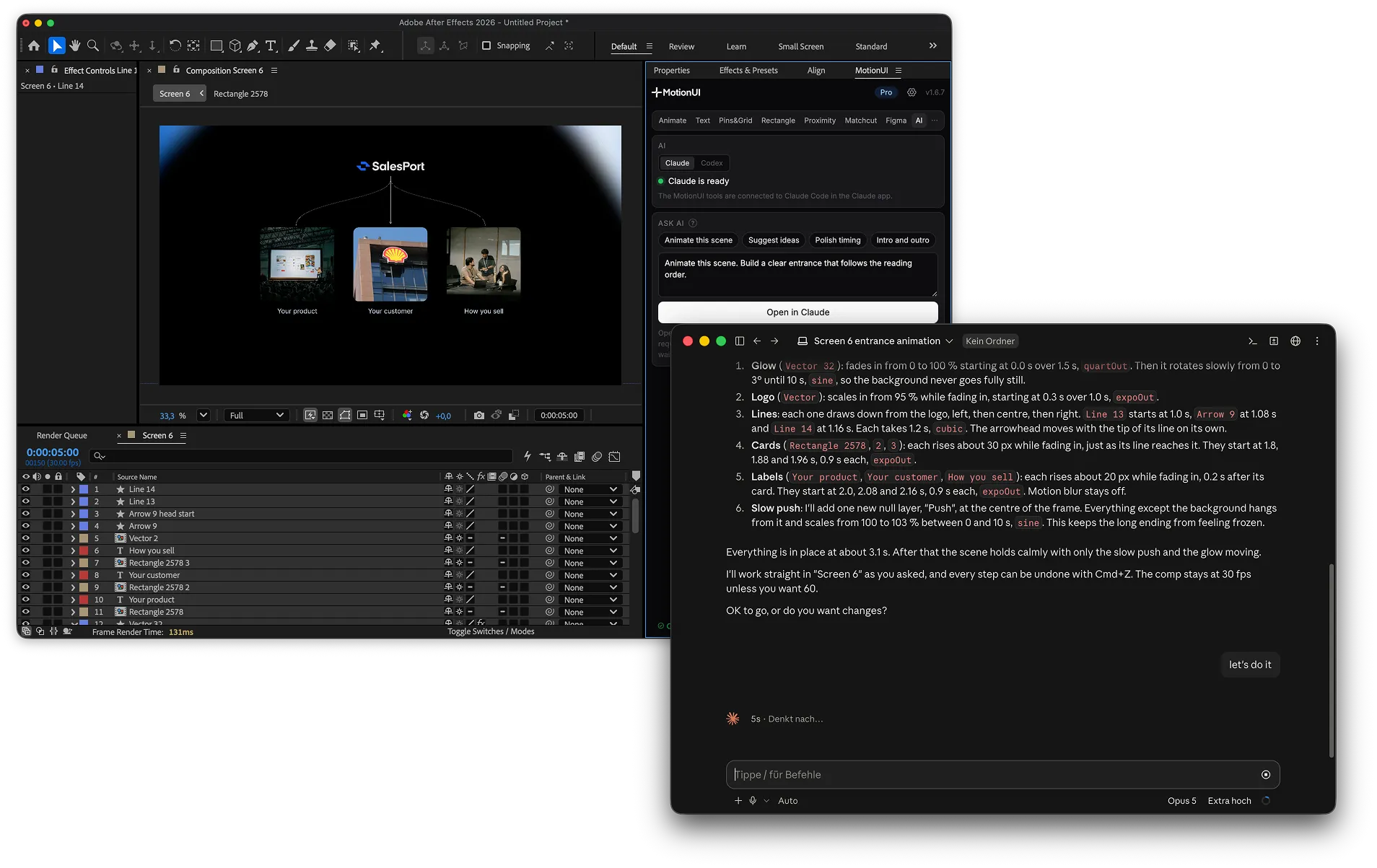
Claude Code integration
Claude Code can control the MotionUI plugin to build the animation you describe. It works with real layers and effects in After Effects, so you can direct every change.
Uses the same MotionUI tools you do
Refine the animation with your next instruction
Keep an editable After Effects project
“Cut a 60-second version from the three strongest statements and mark the beats.”
New sequence with the cut on V1 and a marker on every bar of the music.


Premiere plugin
Claude edits in Premiere Pro for you. There are no animation tools in Premiere: you say what the film needs, and Claude cuts, marks, grades and exports right in your project.
Cuts interviews from the transcript
Beats, fades, color and captions on request
Works through Claude, part of Pro
Ask Claude. MotionUI does the work.
Write it like you’d brief an editor. MotionUI does the work in After Effects and Premiere Pro, and everything stays editable.
Less setup. More animation.

Give your screen a natural flow
Bring layers in one after another so your viewers can follow the action.

Make your words stand out
Draw attention to your message with text animation you can keep editing.

Put the focus on your design
Highlight the details that make your interface work with animated design overlays.

Show how your interface responds
Make elements react as the cursor moves across your design.

Keep the story moving
Connect your screens with smooth transitions that are ready to use.
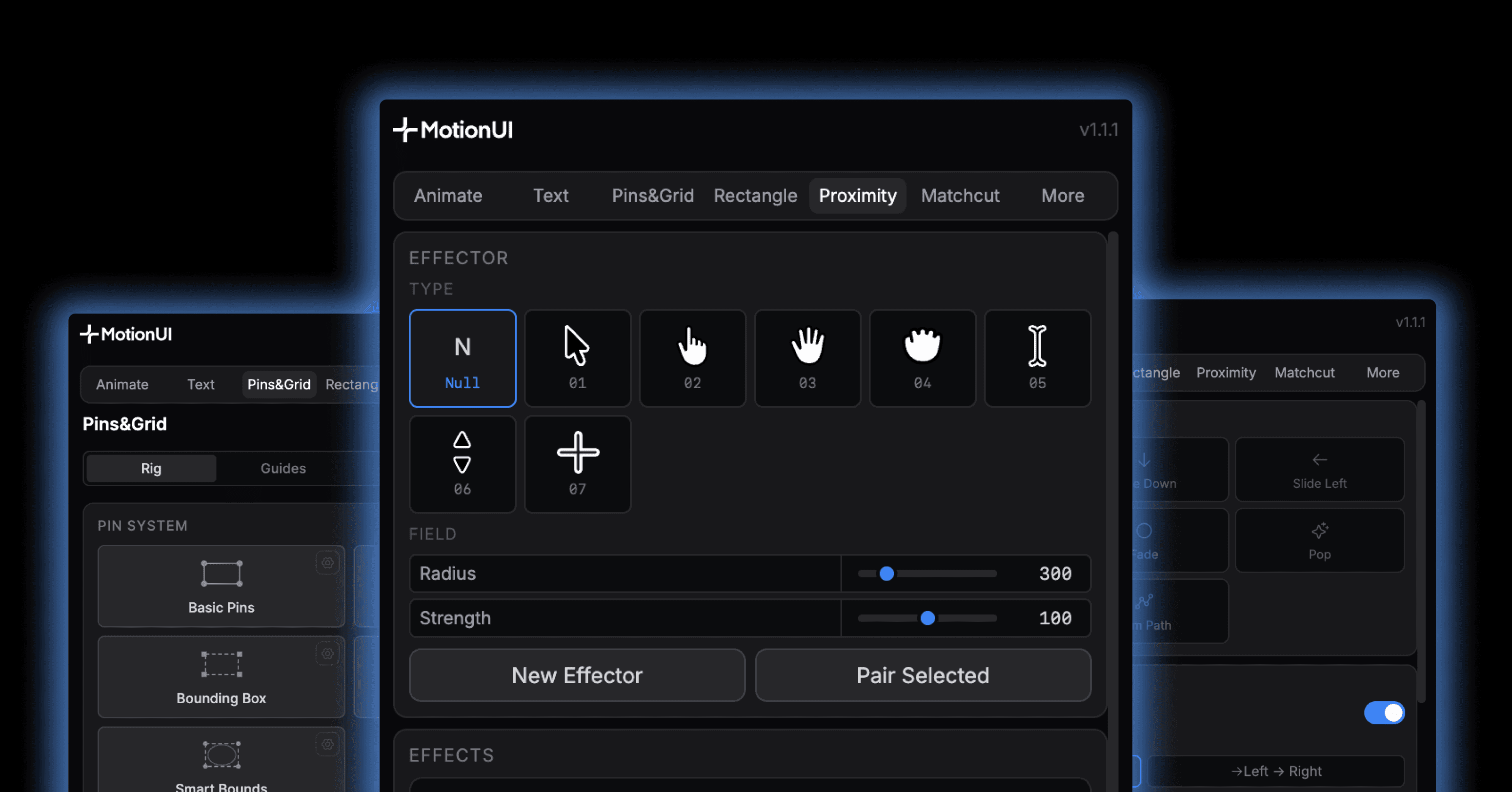
Make your shapes more flexible
Reshape your interface elements with simple controls instead of rebuilding them.
to
in one click
Send it from Figma. Keep editing in After Effects.
Made with MotionUI
All videos are created with MotionUI and no other plugins.
Recreated, original by motion.fx
Created by HIVER for SalesPort
Created by HIVER
Recreated, original Framer ad
No credit card needed


Used by top-level editors
Join the comunity of top-level motion graphics editors.
5.0
★★★★★
Rating
★★★★★
“This is a game changer tool for all motion designers, worth every penny. Clean interface, easy to use and saved me tons of hours in repetitive tasks.”

Ahmed Magdy Hatata
Verified purchase
★★★★★
“Great plugin, can’t actually believe this is free. Thanks!”
Johannes Toro
Verified purchase
Used by motion designers who make videos for
OpenAI

ElevenLabs

Timly
Apple
Pricing
Start animating for free. Upgrade to Pro when you want to take your work further.
Save 26% with yearly billing
Free
Bring your first screen to life.
$0
No credit card needed.
Basic presets and easing
Rectangle rigs
2 text effects
macOS and Windows.
Pro monthly
Full access to MotionUI.
$19
per month
$19 billed monthly.
Import your Figma designs
Use every animation tool
Build scenes with AI
macOS and Windows.
Pro yearly
Save 26%
Full access to MotionUI.
$14
per month
$168 billed yearly.
Import your Figma designs
Use every animation tool
Build scenes with AI
macOS and Windows.
Billed monthly or yearly. Cancel any time.
Compare plans
FEATURE
FREE
PRO
Animation
Basic animation presets
Easing curves and custom beziers
Sequencing across many layers
Camera paths
Figma to After Effects
Send a selection or a whole frame
Rasterize a selection into flat images
Build a new comp from a frame
Create a Figma frame in the size of a comp
Preserve your Figma layer structure
Text
Fade up and Typewriter
All 10 text effects
Animated text gradient
Rigs and overlays
Rectangle rigs
Pins and Grid
Proximity effectors
Matchcut transitions
Cursor builder
Claude and Codex
Hand a scene over from After Effects
Let the assistant build in your Figma file
Scene review and reference analysis
Premiere Pro, through Claude
Cut interviews from the transcript
Beat markers and audio fades
Color correction, looks and masks
Captions, reframing and exports
Is the Figma plugin in the Figma Community?
Do I need a paid Figma plan or credits?
What is MotionUI?
How do I get started?
Is MotionUI available for Windows?
Do I need Claude for every animation?
Where can I download MotionUI or upgrade to Pro?
How do updates work?
Are Figma, After Effects, Premiere Pro and Claude included?
What can Claude do with MotionUI?
Does MotionUI work in Premiere Pro?
Can I import Figma designs without Claude?
Become a motion pro today
Start animating in After Effects for free, without an account or credit card.

Bring your interface to life.
MotionUI